Cross Stitch Thread Organizer
- 4.6
- Rating
- 10.00K
- Installs
- $2.99
- Price

 Analysis by App-foxy
When I first opened Cross Stitch Thread Organizer, I understood its appeal immediately: it is made for the practical side of embroidery, the part that usually lives in small boxes, handwritten notes, project bags, and half-remembered color choices. Instead of treating cross-stitching as a gallery or a pattern-reading activity, this Art & Design app focuses on keeping your thread collection and projects easier to follow.
That narrow purpose is also its biggest strength. I would not recommend it to someone looking for a general drawing app, a pattern marketplace, or a social place to show finished work. I would recommend it to a stitcher who has accumulated floss over time and wants a dedicated place to record what is owned, what is being used, and what still needs attention. The app comes from IsegrimStitches, costs $2.99, and is suitable for Everyone, which makes the decision fairly simple if your main problem is organization rather than creativity.
What the app feels like when you begin
The first thing to expect is a utility rather than a decorative hobby companion. Its store short description calls it a Cross Stitch Organizer, and that is an accurate way to approach it. The useful question is not “What can I make inside this app?” but “Can I stop losing track of the materials and projects I already have?”
You May Also Like

 Blood Strike: 2.5 Anniversary
Blood Strike’s Loadouts Turn Every Drop Into a Tactical Gamble
A close look at Blood Strike’s custom loadouts: how fast access to signature weapons reshapes its battle royale rhythm, rewards preparation, and narrows the gap between fights.

 Pandora - Music & Podcasts
Pandora’s Music Is Easy to Start, but Harder to Recover
Pandora’s strength is its low-effort path from a seed to a station. Its weak spot is how much confidence it asks you to place in connection, setup, and quiet recovery.

 8 Ball Pool
 Is Built on Rivalries, Rematches, and Routine
A close look at the rivalries, rematches, shared routines, and unanswered safety questions that turn a quick pool match into a persistent mobile community.

 Samsung Music
’s Quiet Strength Is Playing What You Already Own
Its reach comes less from spectacle than from dependable access to a personal library. That simplicity is both the app’s strongest retention engine and its ceiling.

 AccuWeather: Weather Radar
AccuWeather Review: A Quick, Clear Forecast for Everyday Decisions
For everyday plans, the best forecast is the one you can understand quickly. AccuWeather makes rain timing, radar, and local conditions easy to act on, with a few trade-offs.

 Hill Climb Racing
Why Hill Climb Racing Still Turns Crashes Into One More Run
A tiny car, a bumpy hill and one more upgrade: Hill Climb Racing keeps resurfacing because its simple chaos makes every near-miss feel personal.
More From Our News Desk
View All News


In my experience, this distinction matters. Many stitchers begin with a small selection of colors and can remember nearly everything. Later, several projects may use similar shades, spare skeins get placed in different containers, and a pattern is paused for months. At that point, a simple record becomes more valuable than another inspirational feature. This app is aimed at that moment.
The app has been available since March 3, 2016, and its current version is 4.10. That longer history gives it the feel of a focused tool that has stayed with its original purpose instead of constantly changing direction. It has an average rating of 4.6 from around 266 ratings, with about 116 written reviews, and more than 10K installs. Those figures suggest a small but clearly interested audience rather than a mass-market app.
It runs on Android 7.0 and later. That is useful for people using an older device for craft projects, perhaps a tablet kept beside a chair or a phone that is no longer your everyday handset. I would still check your device compatibility before buying, especially if you use an older operating system, but the minimum requirement is not demanding by modern standards.
Why a dedicated organizer can beat a notebook
A notebook is flexible, cheap, and often pleasant to use. I still like paper for quick sketches and notes beside a pattern. The problem is that handwritten thread records become difficult to search mentally once the collection grows. A dedicated organizer gives each item a more consistent place and makes it easier to connect materials with ongoing projects.
The advantage is not that the app makes stitching faster. It does not replace a pattern, needle, hoop, or good lighting. Its value appears before and after the actual stitching: when preparing a project, checking supplies, and returning to work after a break. That makes it especially helpful for people who work on several designs at once or buy thread for future projects.
There is also a useful psychological benefit. When supplies are recorded, starting a new project feels less like opening an unknown box and more like checking a small personal inventory. That can reduce duplicate purchases and make unfinished work feel manageable. The trade-off is that you must invest time in entering information before the organizer becomes genuinely useful.
Setting it up without turning the hobby into paperwork
I would not begin by trying to record every skein in the house. That sounds thorough, but it is the fastest way to make setup feel like an administrative chore. A better first session is to choose one active project and enter only the thread information you need for that project. This creates a useful record quickly and gives you a reason to learn the app’s structure.
Before opening the app, gather the project pattern, the thread packet or storage box, and a pencil or note for anything you cannot identify immediately. The goal is not perfect cataloging on the first attempt. The goal is to create a dependable starting point. If a color is still in a tangled group or its label is hidden, mark it for later rather than stopping the entire process.
I also recommend deciding on one naming habit before adding anything. For example, use the same wording for project names that you would use on your physical pattern folder. If you switch between a designer’s title, a subject description, and a personal nickname, you may later wonder which entry is which. Consistency matters more than cleverness.
The same principle applies to thread records. Enter information in the way you will actually recognize it when searching through your supplies. A catalog is only helpful if the labels make sense to your future self. This is one of the less obvious trade-offs of an organizer: the app can hold your records, but it cannot decide the personal system that will keep those records clear.
A practical first setup for a real project
Imagine that I am preparing a small floral design for an evening of stitching. I would create the project first, then work through the colors that are physically beside me. I would not unpack every storage box or try to reconstruct the history of my entire collection. I would record the colors connected with that design, note which ones are already available, and leave uncertain items aside until I can check them properly.
This approach produces a meaningful result in one sitting: the project exists in the organizer, its main materials are associated with it, and I have a clearer idea of what is ready. That is more useful than a beautifully complete inventory that has no connection to the project I actually want to stitch tonight.
For a large collection, divide the work into sessions by storage box, project, or color family. Do not mix all three systems at once. A box-by-box pass is easier if your physical storage is already organized that way; a project-by-project pass is better if you regularly buy supplies for specific patterns. The app becomes more valuable when its digital structure follows the way you naturally retrieve things.
Because the app is paid rather than free, I would make this setup plan before purchasing. The price is modest, but the real cost is your time. If you only stitch occasionally and own a small number of threads, a paper list may remain quicker. If you repeatedly forget what you own, the dedicated record has a better chance of earning its place.
Your first useful success
The first successful action should be something you can use immediately, not a tour of every possible record. For me, that means creating one project and connecting it with the threads currently needed for that project. Once that information is in place, the app has already done something a notebook often fails to do: it has tied supplies to a specific piece of work.
After that, test the record before adding more. Close the app, return to it later, and see whether the project name and thread information still make sense without the physical pattern in front of you. This small test reveals whether your labels are clear enough. If you have to remember what an abbreviation meant, change it while the collection is still small.
A second useful action is recording a project that is paused rather than only the one you are actively stitching. This is where an organizer can help with a common everyday problem. Suppose I put a winter design away in a drawer because I want to work on a gift first. Several weeks later, I may remember the design but not whether I had already gathered every color. A project record gives me a place to check before I buy supplies again.
That workflow is more valuable than simply listing thread names. It turns the app into a bridge between planning and resuming. When you return to an unfinished piece, you can begin by checking its project record rather than emptying every craft container onto the table.
Use it during a normal stitching day
Here is the kind of scenario in which I think the app earns its keep. I have a spare hour after dinner, but I do not want to begin a new design. I open the organizer, look at a paused project, and check the materials associated with it. If the needed threads are already together, I can prepare the project without shopping or searching through unrelated boxes. If something is missing, I know that before settling in with the pattern.
Another useful moment comes after finishing a stitching session. Rather than trying to remember later which colors were used, I would update the project while the materials are still on the table. That habit takes less effort than reconstructing the information from memory. It also helps prevent the common mistake of returning a thread to storage without remembering which project it belongs to.
For people who travel with a small project bag, the app can also serve as a preparation check. Before leaving home, review the project record and compare it with the contents of the bag. This is not a replacement for physically checking your supplies, but it gives you a deliberate checklist instead of relying on a vague impression that everything is packed.
Where first-time users may hesitate
The main confusion is likely to come from thinking of the app as an automatic inventory. It is not a magic scan of your craft room. The usefulness of the information depends on what you enter and how carefully you maintain it. If you add a project but never update it when supplies move, the record can become less trustworthy than a simple note on the current project bag.
That is why I would treat the organizer as a living record, not a one-time database. When you finish a project, tidy its entry while the details are fresh. When you move spare thread into another container, make a small update if that location matters to your workflow. The more your physical collection changes, the more important this habit becomes.
Another possible source of friction is the difference between a pattern’s requirements and what you physically own. A pattern may call for a color, while your storage contains a close substitute, a partial skein, or an unlabeled length. Do not record those as identical unless that distinction is genuinely useful to you. For some stitchers, “available for this project” is enough. For others, separating exact supplies from possible substitutes prevents mistakes. Decide which level of precision you need.
I would also avoid entering speculative information just to make a project look complete. If you are unsure whether a thread belongs to a design, leave your record understandable rather than filling it with guesses. A smaller accurate record is more useful than a large one that encourages false confidence.
What it does not replace
This app is not the right choice if your main need is pattern design, image editing, color experimentation, or step-by-step stitching instruction. Its category is Art & Design, but that label should not lead you to expect a drawing canvas. The focus is organization around embroidery, not the creation of artwork inside the app.
It is also not ideal for someone who wants a broad craft-management platform covering every hobby. A general notes app may be better if you need to combine shopping lists, photographs, measurements, and unrelated project notes in one place. A spreadsheet may suit a person who wants custom columns and complex sorting. Paper remains better for anyone who enjoys writing by hand and has a small, stable collection.
On the other hand, those alternatives can create their own problems. A spreadsheet may be powerful but feel too formal for a relaxing hobby. A notes app can hold almost anything but may not provide the focused structure you want. Paper is quick at first but becomes harder to maintain across multiple projects. My view is that Cross Stitch Thread Organizer sits in the useful middle: more purposeful than general notes, less demanding than building your own database.
The price also affects who should choose it. At $2.99, it is inexpensive enough to consider as a practical craft tool, but it is not a free experiment. If you already know that you dislike maintaining digital lists, paying for a dedicated organizer will not change that habit. If you enjoy having a clear record and regularly lose time checking supplies, the focused design makes more sense.
Ways to get more value after the first project
Once the first project is working, resist the urge to catalog everything immediately. Add the next project when you naturally prepare it, then use the same naming and recording habits. This gradual approach keeps the app connected to real stitching instead of turning it into a separate hobby.
A useful advanced habit is to record projects at different stages rather than treating them all as active. A project you are planning, one you are currently stitching, and one you have paused do not need the same attention. Keeping those stages mentally distinct makes the organizer more useful when you are choosing what to work on next.
I would also use the app before shopping, not after. When a new pattern catches your eye, check your existing project and thread records first. You may discover that the design fits supplies you already own, or that you have started a similar project that deserves finishing. This turns the organizer into a decision-making tool rather than a passive archive.
Another non-obvious benefit is learning your own buying patterns. After using the app for a while, you may notice that certain colors appear repeatedly across projects or that you keep purchasing supplies for designs you rarely start. The app does not need to judge those habits; simply having the records together can make them visible. That can lead to more deliberate project choices.
For shared craft spaces, keep the record wording simple enough that another person could understand it. If a family member helps sort supplies or returns a project to storage, clear project names and thread descriptions reduce the chance of items being separated. This is a small detail, but it matters when the organizer is supporting a physical collection used by more than one person.
How much maintenance is reasonable?
I would spend a few minutes updating a project when I begin or finish a session, rather than scheduling a large monthly inventory. Regular small corrections are less tiring and more accurate because the materials are already in front of you. A major cataloging session is useful only if your collection has become so disorganized that you need a reset.
Do not aim for a perfect digital mirror of every thread. Aim for records that answer practical questions: Which project is this for? Do I already have the materials? What should I pack before I sit down? Which unfinished design is ready to resume? If the app answers those questions reliably, it is doing its job.
This is also where I see the clearest limitation. A dedicated organizer rewards consistent behavior. Someone who enters information once and never returns to it may feel that the app is more work than expected. Someone who uses it at the natural transition points of a project—planning, packing, pausing, and finishing—will probably find it much more helpful.
My recommendation for a first-time buyer
Cross Stitch Thread Organizer is a focused paid app for stitchers who want their thread collection and projects to remain understandable over time. I like that it addresses a real problem without pretending to be a complete creative studio. Its strongest use is not showing off a finished design; it is helping you make a calm, informed start on the next stitching session.
I would recommend it to a beginner who has already started collecting supplies, to an experienced stitcher with several unfinished designs, and to anyone who repeatedly buys thread because they cannot remember what is at home. I would skip it if your collection is tiny, if you prefer paper, or if you need pattern creation and image tools rather than project organization.
The safest way to begin is simple: install it, choose one active project, record the materials you can identify, and return later to check whether the record helps you prepare without guesswork. If that first small test saves you from searching through boxes or buying a duplicate, you have found the app’s real purpose.
For me, that is a worthwhile standard. It does not need to transform cross-stitching to be useful. It only needs to make the quiet practical parts—remembering, preparing, storing, and returning—less frustrating. At its $2.99 price, the best reason to choose this app is not the size of your collection, but how often your collection gets in the way of enjoying your projects.
FAQs for Cross Stitch Thread Organizer
01What is Cross Stitch Thread Organizer used for?
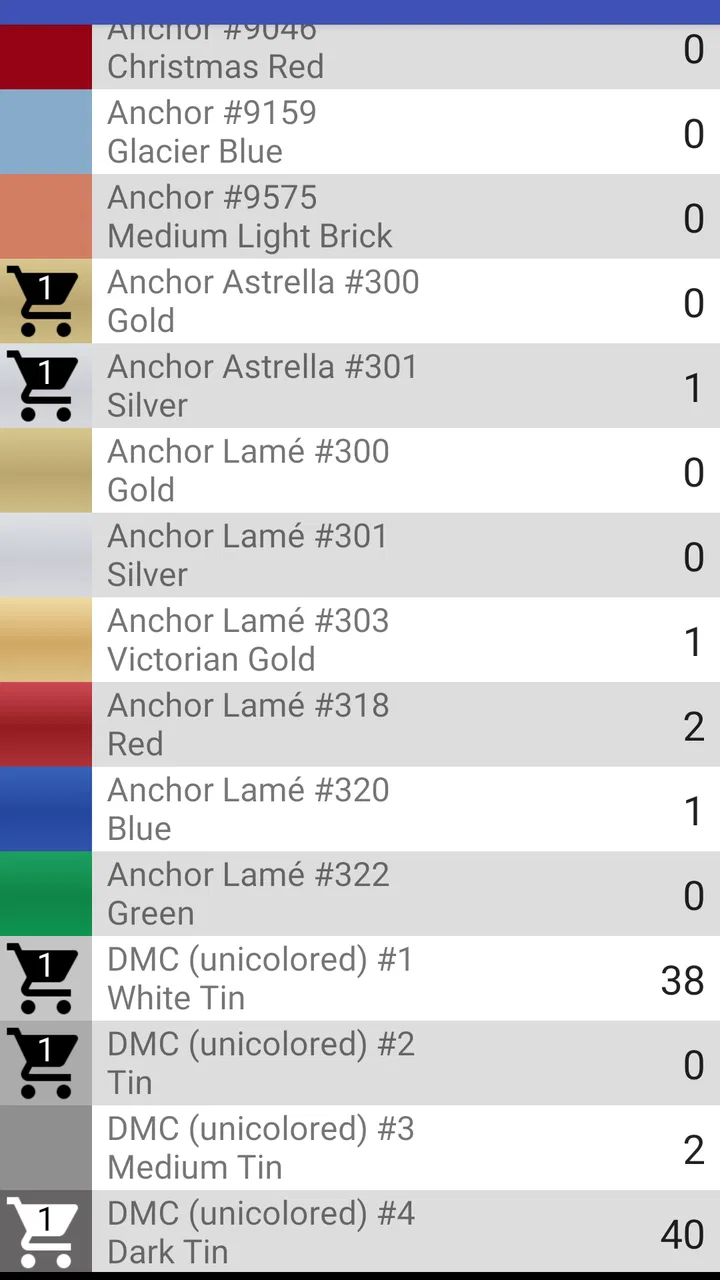
Cross Stitch Thread Organizer is designed to help stitchers catalog, organize, and manage their embroidery floss collections. You can record thread colors, brands, codes, quantities, and storage locations, making it easier to find the right skein before starting a project. It is particularly useful for users with large collections who want to reduce duplicate purchases and keep supplies under control.
02Can I add my own threads and customize the inventory?
Yes, the app is intended to let you build an inventory that matches your personal collection rather than relying only on a preset list. You can generally add thread information, adjust quantities, and update entries as supplies are used or replaced. This makes it suitable for different brands, storage systems, and personal labeling habits, although the exact customization options may depend on the version installed.
03Does Cross Stitch Thread Organizer include color codes and thread details?
The app focuses on organizing thread by useful identification details such as color names, numerical codes, brand information, and quantity. These records can make pattern preparation much easier, especially when a design requires several similar shades. Users should still compare the displayed information with the original pattern or physical thread, since screen colors may vary between devices.
04Can the app help me determine which threads I still need for a pattern?
Cross Stitch Thread Organizer can be helpful when preparing a project by allowing you to compare required colors with the threads already in your collection. By checking your inventory, you may identify missing shades before shopping and avoid buying colors you already own. Its usefulness depends on how accurately you enter and maintain your stock, so updating quantities after each project is recommended.
05Is Cross Stitch Thread Organizer suitable for beginners and experienced stitchers?
Yes, the app can be useful for both beginners and experienced cross-stitch enthusiasts. Beginners may appreciate having a simple digital record instead of managing loose labels or handwritten lists, while experienced stitchers can benefit from tracking a larger collection across multiple projects. Before downloading, remember that the app works best when you consistently enter correct thread details and keep the inventory updated.
Pros
- Stores thread colors
- brands
- and quantities in one organized place.
- Makes it easier to find matching floss for new projects.
- Useful for tracking supplies across multiple cross-stitch projects.
- Can reduce duplicate purchases by showing what you already own.
- Helpful for keeping a portable digital inventory while shopping.
Cons
- Initial cataloging can take considerable time for large thread collections.
- Manual updates are needed whenever thread is used or purchased.
- Color matching may vary between screen display and physical floss.
- Less useful if your supplies are not sorted by brand or color number.
- Some advanced organization features may require in-app purchases.

Cross Stitch Thread Organizer
Gallery